Search engines
The theme adds search engine data to your pages: your shop and its social profiles, the site search box, products with star ratings from a reviews app, articles, breadcrumbs and FAQ. It helps search engines show richer results. Nothing needs turning on.
Each FAQ section adds its questions while Add FAQ structured data is on (the default). If a page has more than one FAQ section, leave it on in one section only and turn it off in the others.
Star ratings come from the standard product reviews metafields, so you need a reviews app that writes them. Social profiles come from Theme settings > Social media.
Show the shop as a local business
For shops with a store or gallery people can visit. In Theme settings > Search engines:
- Turn on Show the shop as a local business. It uses the address and phone in Settings > Store details, and is added to the home page only once the address includes a city.
- Pick a Business type: Store, Art gallery, Home goods store, Hardware store, Furniture store, Jewelry store or Clothing store.
- Fill in Opening hours: days and hours, separated by commas, for example
Mo-Fr 09:00-18:00, Sa 10:00-16:00.
Printing
Printing uses the browser's print command, and needs no setting.
- Product page: prints a clean one-page product sheet with the picture, title, price, chosen options, details and link, instead of the full page.
- Printable product details block: prints a framed details page on one A4 sheet. See Product page.
- Custom file: the Printable product details block can print your own image page (for example a scanned certificate) and link to a PDF, each connectable to product metafields. See Product page.
- Printable detail blocks: add your own rows, such as Material or Care, to both printed sheets, typed in or connected to product metafields. See Product page.
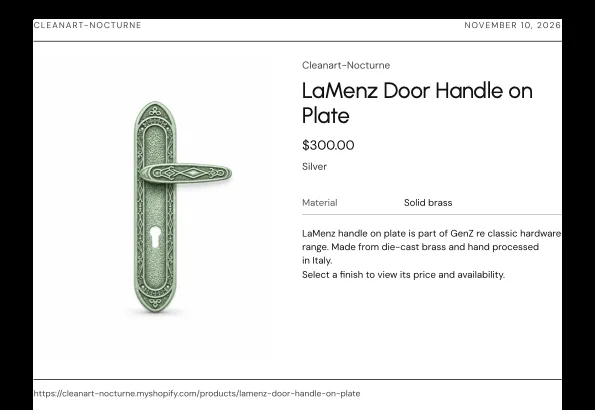
The print styles live in a print-only stylesheet, so they don't affect page speed.